
How to Add Links to TikTok Bio in 2026: Complete Step-by-Step Guide
Learn how to add clickable links to your TikTok bio in 2026 and proven strategies to turn TikTok traffic into real clicks, sales, and audience growth.
TikTok remains one of the fastest platforms for generating attention in 2026, but one recurring issue continues to confuse creators and businesses: not everyone can add a clickable website link to their bio.
Based on ongoing platform behavior analysis, creator reports, and observed rollout patterns across accounts, TikTok’s bio link feature is no longer strictly tied to follower count. Instead, access appears to depend more on account trust signals, region, and account classification.
This guide explains exactly how to add a clickable link to your TikTok bio in 2026, why the feature sometimes disappears, how Business Accounts work today, and what creators can do to improve both access and click-through rates.
Who Can Add Links to Their TikTok Bio
One of the biggest misconceptions is that every TikTok account automatically gets access to clickable bio links. That is no longer consistently true.
In 2026, TikTok appears to evaluate multiple factors before enabling the website field, including:
-
Account type
-
Regional availability
-
Posting activity
-
Account trust signals
-
Community guideline history
-
Device and app version
Based on creator reports throughout 2025 and 2026, TikTok now relies less on strict follower thresholds and more on account quality and platform trust.
Business Accounts Usually Unlock Links Faster
For most users, switching to a Business Account is still the fastest way to access the website field.
To switch:
-
Open TikTok
-
Go to Settings
-
Tap “Account”
-
Select “Switch to Business Account”
-
Choose your category
After switching, many users immediately see a “Website” field inside “Edit Profile,” although rollout timing still varies.
Business Accounts are commonly used by:
-
Ecommerce brands
-
Coaches and consultants
-
Freelancers
-
Agencies
-
Local businesses
-
Creators selling products or services
One important detail many tutorials ignore is that Business Accounts also come with limitations. Some commercial copyright music restrictions still apply, which means certain trending sounds may become unavailable compared to personal accounts.
However, Business Accounts also provide additional analytics, advertising tools, ecommerce integrations, and traffic insights that are useful for creators using TikTok professionally.
Some Personal and Creator Accounts Also Have Access
TikTok has gradually expanded website access to selected creator accounts as well.
Some personal profiles now receive clickable links without switching to business mode, especially accounts that show:
-
Consistent posting activity
-
Stable engagement
-
Verified contact information
-
Long-term account history
Still, access remains inconsistent. Two accounts with similar follower counts may see completely different profile features depending on region and rollout timing.
If your goal is traffic generation, relying on random feature rollouts is usually unreliable. Switching to a Business Account remains the more consistent option.
Regional Restrictions Still Exist
TikTok continues testing features differently across countries and regions. Availability can vary significantly between the US, Europe, Southeast Asia, and newer TikTok markets.
Some users receive website access immediately, while others wait several days after switching account types.
Age restrictions may also affect external linking features. Younger users sometimes lose access to clickable website fields entirely.
If your website field is missing:
-
Update TikTok to the latest version
-
Restart the app
-
Clear cache
-
Wait 24–72 hours after switching account types
-
Reinstall the app if necessary
In many cases, the feature eventually appears automatically after TikTok refreshes account permissions.
What Are the Benefits of Having a Link in TikTok Bio
Understanding how to add links to TikTok bio matters because TikTok traffic moves extremely fast. A bio link creates a direct path between your content and the action you want users to take next.
Without that path, even viral videos may fail to generate meaningful business results.
Turn TikTok Views Into Real Traffic
TikTok’s algorithm is excellent at generating attention, but attention alone does not grow a business. A clickable bio link helps convert passive viewers into active visitors.
For example:
-
A fitness creator can direct viewers to workout programs
-
A beauty influencer can link skincare products
-
A consultant can drive traffic to booking pages
-
A creator can promote newsletters or courses
The faster users can move from video to destination, the higher the conversion potential becomes.
Increase Ecommerce and Affiliate Sales
TikTok has become one of the most powerful ecommerce discovery platforms in the world. Many users now treat TikTok as a search engine for product recommendations, reviews, tutorials, and buying inspiration.
If someone watches a product demo and becomes interested, your bio link often determines whether that interest becomes a sale.
Instead of forcing users to search manually, a direct bio link reduces friction and improves purchase intent. This is especially important for:
-
Dropshipping stores
-
Amazon affiliates
-
Digital products
-
Print-on-demand businesses
-
Subscription offers
Many marketers underestimate how much revenue a properly optimized bio link can generate over time.
Build an Audience Outside TikTok
Algorithms change constantly. Depending entirely on one platform is risky for long-term growth.
That is why experienced creators use TikTok bio links to build owned audiences through:
-
Email newsletters
-
Communities
-
Websites
-
Memberships
-
SMS lists
This strategy creates more stability and gives creators direct access to their audience even if platform reach fluctuates.
Improve Brand Credibility
A well-structured bio link also improves professionalism. When users visit your profile and see a clean landing page, organized links, and a clear call to action, your brand instantly feels more trustworthy.
Small details like this matter more than many creators realize, especially in competitive niches.
What Type of Link Should You Add in TikTok Bio?
The best TikTok bio link depends entirely on your goal.
| Link Type | Best For | Example |
|---|---|---|
| Landing Page | Freelancers & brands | Service page |
| Product Page | E-commerce creators
|
Single product |
| Newsletter | Audience building | Email signup |
| Community Links | Long-term engagement |
|
| Link-in-Bio Tool | Multiple links | Linktree, Beacons, BioLinku |
1. Personal Websites and Landing Pages
Freelancers, consultants, and personal brands often benefit most from a dedicated landing page.
A focused landing page can:
-
Explain services clearly
-
Display testimonials
-
Capture email leads
-
Showcase portfolios
-
Improve credibility
Compared to sending traffic to multiple disconnected platforms, focused pages usually convert better.
2. Ecommerce Product Links
If your content centers around products, tutorials, or reviews, direct product pages often outperform generic homepages.
Examples include:
-
Beauty creators linking skincare products
-
Fashion creators linking collections
-
Tech creators linking reviewed gadgets
-
Food creators linking kitchen tools
Reducing unnecessary clicks improves mobile conversion rates significantly.
3. Newsletter and Lead Magnet Pages
Many creators now use TikTok primarily for audience acquisition.
Free resources such as:
-
Templates
-
Mini courses
-
Checklists
-
Creator guides
-
PDFs
often perform well because TikTok audiences respond strongly to fast, practical value.
4. Community and Social Platform Links
Some creators use TikTok for discovery while building deeper engagement elsewhere, including:
-
YouTube
-
Discord
-
Instagram
-
Patreon
-
Podcasts
In these cases, the bio link acts as a transition point between casual viewers and long-term followers.
5. Link-in-Bio Tools
TikTok only supports one clickable website field, which is why many creators use link-in-bio platforms.
Tools like Linktree, Beacons, and BioLinku allow creators to organize multiple destinations on a single landing page. Many also include click tracking, traffic analytics, and mobile optimization features.
For creators managing multiple campaigns or platforms simultaneously, link hubs are often the most practical solution.
How to Add Links to TikTok Bio: Easy Steps
Now let’s go through the exact process of how to add links to a TikTok bio step by step.
Step 1: Open Your TikTok Profile
Open TikTok and tap your profile icon in the bottom-right corner.
Before adding a link, review your profile as a visitor would. Your profile photo, username, and bio should already communicate what users can expect after clicking.
Step 2: Switch to a Business Account If Necessary
If you do not see a website field, switching to a Business Account is usually required.
Go to:
Settings → Account → Switch to Business Account
Choose the category that best matches your niche or business type.
Many creators worry that Business Accounts reduce reach. Based on creator data and platform observations in 2025–2026, content quality, watch time, and retention appear far more important than account type itself.
Step 3: Open “Edit Profile”
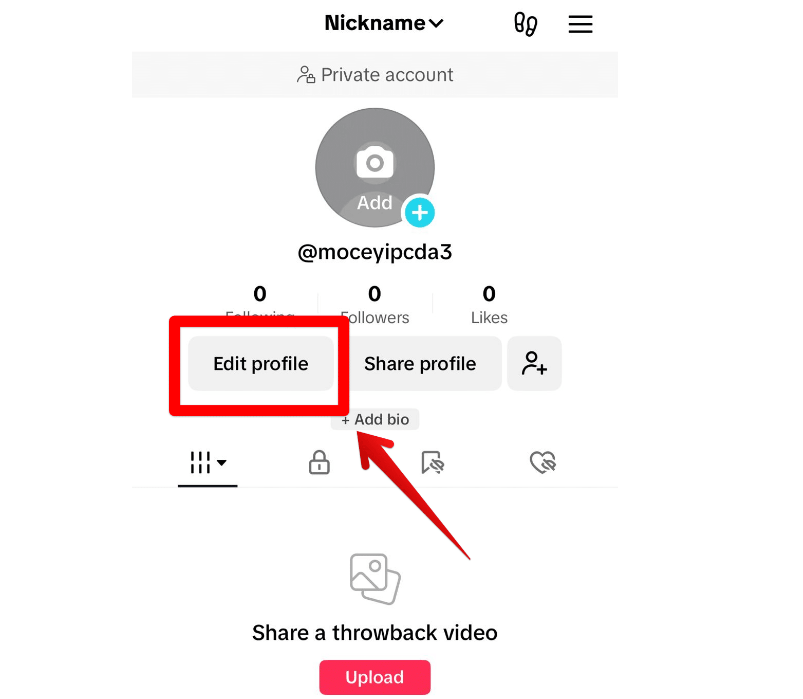
Inside your profile page, tap “Edit Profile.”
Depending on your app version, you may see:
-
Website
-
Add Website
-
Links
TikTok changes interface wording occasionally, but the process remains similar.
Step 4: Paste Your URL Correctly
Always use the full HTTPS version of your website.
Correct example: https://yourwebsite.com
Common issues include:
-
Missing HTTPS
-
Broken redirects
-
Expired domains
-
Unsafe SSL certificates
-
Spammy URL shorteners
TikTok may reject links that rely heavily on affiliate cloaking or excessive redirect chains.
Step 5: Save and Test the Link
After saving your profile, test the link manually on mobile.
Many creators lose traffic because their landing pages:
-
Load too slowly
-
Break on mobile devices
-
Redirect incorrectly
-
Display formatting issues inside TikTok’s in-app browser
TikTok users move quickly. Even small delays can reduce clicks significantly.
Step 6: Add a Clear CTA to Your Bio
A clickable link performs poorly without context.
Simple CTAs often work better than vague branding statements.
Examples:
-
Download the free creator guide
-
Shop the full collection
-
Join my newsletter
-
Watch the full tutorial
-
Get the free template pack
Clear expectations usually improve click-through rates.
Why You Can’t Add a Link to Your TikTok Bio
Many users searching how to add links to TikTok bio are actually trying to solve missing-feature problems.
Your Account Still Lacks Website Access
The most common issue is simply that TikTok has not enabled the feature for your account type yet.
Business accounts usually solve this problem immediately.
The TikTok App Is Outdated
Old app versions can prevent profile features from appearing properly.
Always:
-
Update TikTok
-
Restart the device
-
Clear cache if necessary
Small technical issues sometimes create unnecessary confusion.
Your Region Has Limited Access
Feature availability still varies by country. Some regions receive experimental features later than others.
This is especially common with business tools and ecommerce integrations.
Policy Violations or Suspicious Activity
Accounts flagged for spam-like behavior may temporarily lose access to profile links.
This includes:
-
Aggressive automation
-
Repetitive spam posting
-
Misleading redirects
-
Unsafe domains
Maintaining a clean account reputation matters more than many users realize.
Why TikTok Sometimes Removes or Hides Your Bio Link After It Appears
Even after you successfully gain access to the TikTok bio link feature, it is not always permanent. Many creators notice that the website field disappears, becomes uneditable, or is no longer visible after previously working normally.
This happens because TikTok does not treat bio link access as a static entitlement. Instead, it can be adjusted or temporarily revoked based on ongoing account signals and platform trust evaluation.
In some cases, the feature may reappear after a delay, while in others it may require the account to regain a certain level of trust or stability before full access is restored.
Common reasons why a TikTok bio link may disappear or become unavailable include:
- A sudden drop in engagement quality or watch time consistency
- Detection of low-quality or unsafe landing pages
- Frequent switching between Personal and Business account types
- Spam-like profile editing behavior in a short time period
- Use of aggressive redirect chains or affiliate cloaking links
- High bounce rate signals (users leaving the landing page too quickly)
Another important but often overlooked factor is destination quality mismatch. If users consistently click your bio link but quickly return to TikTok without engaging further, the system may interpret the link destination as low-value or irrelevant to your content.
In some cases, TikTok may also temporarily limit visibility of the website field during backend testing, regional rollouts, or policy updates. This is especially common when TikTok is experimenting with ecommerce or creator monetization features in specific markets.
If your link suddenly disappears, it does not always mean a permanent restriction. In many cases, the feature returns automatically once account signals stabilize or after a short recalibration period.
Troubleshooting Common TikTok Bio Link Problems
Even after successfully learning how to add links to TikTok bio, technical problems can still happen.
The Link Is Not Clickable
Usually this happens because:
-
HTTPS is missing
-
The account lacks permissions
-
The URL format is incorrect
Double-check the full URL carefully.
TikTok Rejects the URL
TikTok may block suspicious domains, especially low-trust affiliate links or excessive redirect chains.
If your link gets rejected:
-
Use direct domains
-
Avoid spammy parameters
-
Remove unnecessary redirects
Clean URLs generally work better.
The Link Opens Slowly
TikTok users expect instant loading. A slow landing page often destroys conversions before users even see your offer.
Focus on:
-
Mobile optimization
-
Fast hosting
-
Lightweight pages
-
Simple layouts
Your Link CTR Is Extremely Low
Sometimes the issue is not the link itself but the mismatch between content and destination.
If your TikTok content promises one thing but the landing page shows something unrelated, users leave immediately.
Message consistency matters heavily for TikTok conversions.
How TikTok's In-App Browser Impacts Your Bio Link Clicks
When users tap a link in your TikTok bio, it usually opens inside TikTok’s built-in in-app browser instead of switching to Safari or Chrome. This environment is designed to keep users inside the app, but it also affects how people interact with your landing page.
Even if your website is fast, users may still perceive it as slow. TikTok audiences are highly impulsive, and even a 1–2 second delay can cause them to close the page immediately and return to the feed.
The in-app browser can also limit certain functions like tracking accuracy, cookie behavior, and smooth checkout flows, which means some pages convert worse on TikTok than on Google or direct traffic.
In addition, links with multiple redirects (such as affiliate links or link shorteners) may load more slowly or fail more often inside the app.
Because of this, TikTok traffic should be treated as impulse-based mobile traffic, not traditional web traffic. Simple, fast-loading landing pages with a clear call-to-action usually perform significantly better than complex or heavily designed pages.
Best Tips for Optimizing Your TikTok Bio Link for More Clicks
Understanding how to add links to TikTok bio is only the beginning. Optimization is what separates high-performing creators from accounts that waste traffic.
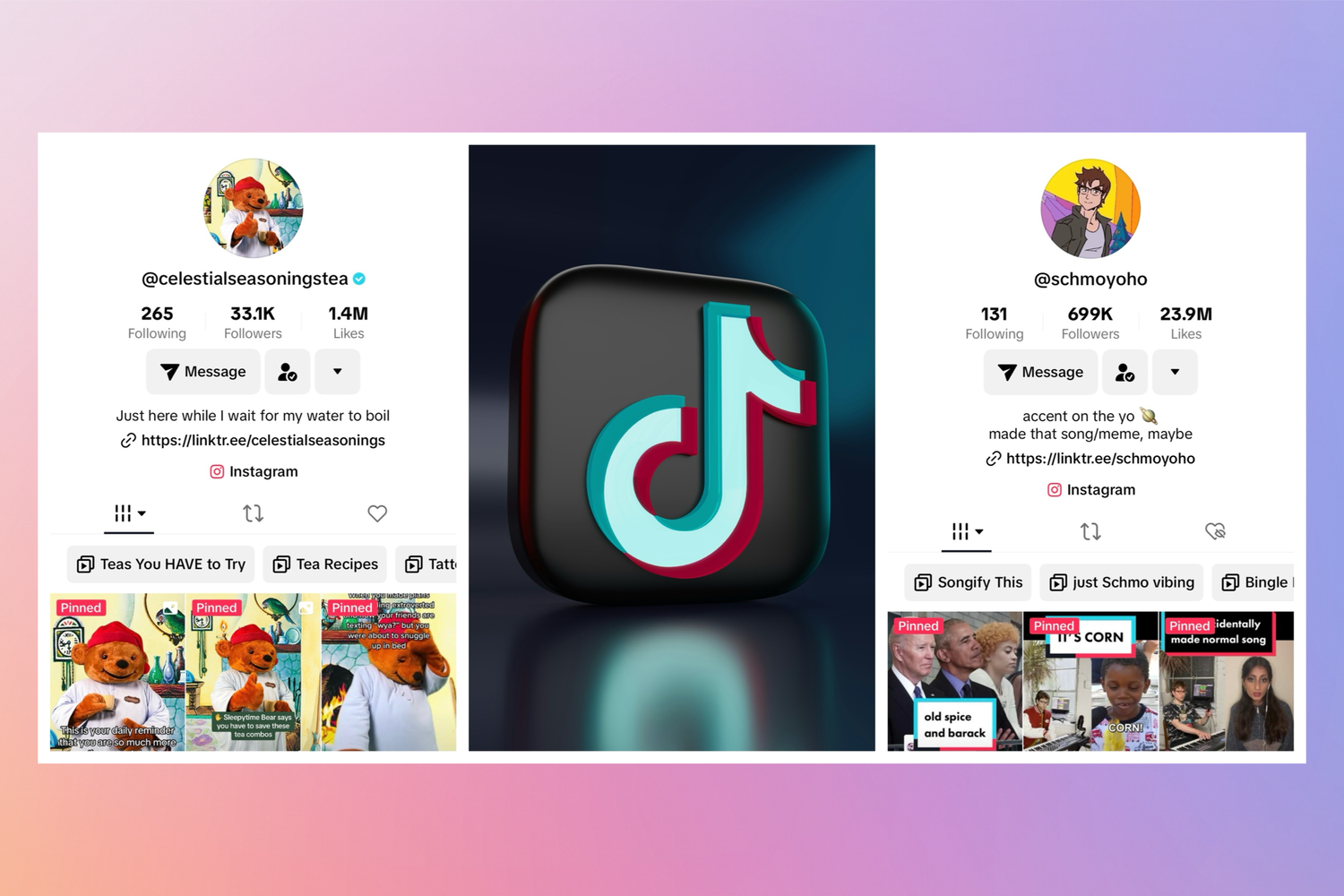
Match Your Landing Page to Your Videos
One of the biggest conversion mistakes creators make is sending all TikTok traffic to a generic homepage. If a video discusses a skincare routine, a free template, or a specific product, users expect the landing page to continue that exact experience immediately.
The first screen matters the most. TikTok users rarely spend time figuring out where to click next. If the page feels disconnected from the video they just watched, bounce rates increase almost instantly.
Creators often see better results when each major content theme has its own dedicated landing page instead of routing everything through one universal destination.
Use Mobile-First Design
Most TikTok clicks happen inside TikTok’s in-app browser, which behaves differently from a normal desktop browsing experience. Heavy animations, oversized popups, cluttered layouts, and slow-loading scripts can hurt conversions much more than many creators realize.
In many cases, simpler pages outperform visually impressive ones. Clean headlines, fast loading times, large buttons, and minimal distractions usually create smoother user flow on mobile devices.
This is especially important for ecommerce traffic. TikTok users tend to make fast decisions, so every extra second of friction increases drop-off risk.
Add Tracking and Analytics
Many creators focus heavily on views while ignoring post-click behavior.
Tracking which videos generate clicks, which landing pages convert best, and where users abandon the process often reveals patterns that are impossible to notice otherwise. Sometimes a video with fewer views drives significantly more conversions simply because the audience intent is stronger.
The creators getting the best long-term results on TikTok are usually not the ones chasing the most traffic. They are the ones optimizing what happens after attention arrives.
Refresh Your Bio Link Around Active Content
TikTok trends move quickly, which means static bio link strategies often become outdated fast.
When a video starts gaining traction, updating your bio link to match that specific topic or offer can improve click-through rates significantly. Many creators now treat their bio link as a dynamic conversion layer rather than a permanent profile element.
The closer the link matches current audience interest, the easier it becomes to maintain momentum between content and conversion.
FAQs About TikTok Bio Links
Do You Need a Business Account to Add Links on TikTok?
Usually yes. Business accounts receive website access more consistently than personal profiles.
Can Personal Accounts Add Links?
Some creator accounts now have access, but availability still varies.
How Many Links Can You Add to TikTok Bio?
TikTok normally supports one clickable website field, which is why many users rely on link hub tools.
Can You Add Affiliate Links?
Yes, although some affiliate networks and redirect systems may face restrictions.
Why Is My TikTok Link Not Clickable?
This usually happens because of formatting errors, missing HTTPS, or account eligibility limitations.
What Is the Best Link to Put in TikTok Bio?
The best link depends on your goal. Ecommerce brands often prioritize products, while creators may focus on newsletters or community building.
Final Words
Adding a TikTok bio link in 2026 is no longer a simple profile feature—it is part of TikTok’s broader trust, conversion, and ecosystem control system.
From real-world creator behavior patterns, the accounts that successfully monetize TikTok traffic are not just the ones that “have a link,” but those that:
- Maintain stable account trust signals
- Match content with landing pages
- Optimize mobile conversion flows
- Treat bio links as dynamic funnels
In other words, the real competitive advantage is not access—it is how you use the access once you have it.